As many of you know, I am considering terminating my contract with AT&T to move over to the Sprint network and purchase a Palm Pre. I made my Pre purchase on Sunday, August 2 at 11pm. By Tuesday, I had my Pre in hand. Having had a few days to use the device, network, and sprint store customer service, I feel it's time for an initial review.
What this is
This will be a review of the Palm Pre hardware, Palm's new webOS, the Sprint network, and Sprint customer service. I will be as in-depth, specific, and un-biased as I can, and critical where I have had problems. I will also be making a comparison between the iPhone and Pre interface functions, which should help people get the idea of the paradigm each platform represents.
What this is not
This is not going to be a tit-for-tat between the iPhone and the Pre. Since comparing usability is a subjective matter, I will not be focusing energy on calling out what platform I feel does things right, and which one(s) don't. There is more than enough content online to help you decide what you like, and you can (and should) always stop by your nearest Sprint or Best Buy to compare several different smart phones for yourself.
Of Pre and Men
The Palm Pre seems to have been released as Palm's hail Mary play- a last ditch effort to retool, reorganize, and release a product that can save the company. How well it is working, and how long Palm can be sustained on the Pre has yet to be seen, and I think making early predictions would be a mistake. I don't think anybody could have seen how big the iPhone would be when Apple released the first generation, and in fact Apple, Inc. itself has been startled by our voracious appetite for smart devices.
Having said that, the underlying Operating System on the Palm Pre is known as webOS. Palm has developed webOS to be a very simple AJAX/HTML5 device that is easy to develop for if you have any web development experience. Since there seem to be an infinite number of web developers in the world, Palm seems to feel confident that this is the best choice.
As of yet, Palm has not released their Software Development Kit (SDK) to the general public, so there are few real-world experiences with development. We'll have to chalk this decision up as a "TBD". There does seem to be quite a bit of buzz in several internet forums, some of which already have "home brew" applications available for download and install. This is much like apps for Jailbroken iPhones- There is no official support, and Palm would prefer you use their distribution methods.
Body
The Palm Pre itself is a plastic body phone with a plastic screen and rubberized keyboard buttons. The phone's body slides open from bottom-to-top revealing a keyboard that extends the phone's dimensions by about 25%. When closed, the Pre is not as tall and not as wide as my iPhone, but it is thicker.
Official dimensions of the Pre are 2.3" wide, 3.9" high, and .67" thick. These numbers mean literally nothing without holding a phone in your hand. Sadly, every store in the world has their cell phones tethered with security cords, so you won't really be able to get a good feel for this unless you can hold an unbridled phone.
The device itself has a curved body and screen, which seems to lend itself very well to holding it in your hand and single-thumb flicking. The curvature also helps the Pre disappear in your pocket, which is an added bonus. For those that carry a blackberry or iPhone in your pocket, you know how bulky it can feel. The Pre feels slightly better, though you will probably want it to be the only thing in your pocket still.
Keyboard
Several people, including myself, were concerned with the device's keyboard size. As we shrink smart phones smaller and smaller, it is clear that they keyboard will pay the ultimate price until it disappears completely. Apple is obviously the first one to recognize this fact, and they have made many non-believers change camps. For now, however, they keyboard on the Pre is absurdly small and yet somehow still functional. Each key is considerably smaller than a quarter of an inch, which means my little finger handily covers a minimum of four keys.
Even with such small keys, I can type "This is a test of how fast I can type on the palm pre. No caps. Don't judge." in 14 seconds, and only making two mistakes. First letter caps are handled by the phone, after any punctuation. Apostrophes are also placed into words where they belong automagically. So, 1 word per second for an average of 60 words per minute. This is far, FAR slower than I have become on the iPhone. Given time, I will become faster- I started at about a word every 20 seconds on Tuesday.
Screen
The Pre's screen measures 3.1" and has a resolution of 320 wide x 480 high. This is the same resolution the iPhone has, but in a screen that measures 0.4" smaller diagonally. This translates into sharper, but smaller images. For some, a smaller screen is not a plausible trade-off, so they probably won't enjoy the Pre. It isn't that the screen is noticeably smaller when using either device, but real estate is real estate.
So far, I have used the Pre in a dark room at night, direct sunlight, and literally every condition between. The brightness has always been high or low enough to comfortably view the screen, and when in direct sun there doesn't appear to be as much glare from the Pre screen when compared to the iPhone. I attribute this to the fact that the Palm screen is curved, and the iPhone is simply flat glass.
Interestingly, the Pre screen feels a bit like the iPhone 3Gs- when you move your finger across the surface, there is very little resistance. One thing I have noticed, however, is that finger and face oil show up on the Pre's screen as though it were some kind of magnet. When looking directly at the screen, you don't notice the streaks and swipe marks, when when the device is off and you look at an angle...it's pretty bad.
As always, a screen protector is a requirement. I don't have one on my Pre just yet, and I haven't developed any scratches or blemishes on the screen or body, but every phone needs a screen protector. All of the major manufacturers have them available online and in stores, many of which are unbelievably inexpensive. I suggest invisiShield from Zagg.
Sound/Vibrate
The external speaker built into the Palm Pre has a good volume range without distortion, and can produce enough sound that it's almost too loud when turned all the way up. In a noisy environment, you will certainly hear your notification sounds...as long as they have some high pitch noises in them.
When enabled, the vibrate is actually pleasant. It's strong enough to be felt when the phone is in your pocket, but doesn't get carried away with the vibrate duration like a Nokia or and LG does. I've found that this reduces the number of "Phantom Vibrate" incidents to zero in my case, which is actually a nice thing. I enjoy not thinking my phone is ringing and I'm missing it.
Sound is, by far, one place that the Pre pulls away from the iPhone and many other competitive smart phones. Most of them do not focus on built-in sound, choosing instead to rely on headphones and Bluetooth headsets. This makes it impossible to share a Youtube video, to listen to a sound clip, or even use speaker phone in nearly any environment on anything but the Pre.
With regard to headphones, the Pre ships with earbuds like most other phones at this point. The buds themselves are decent quality- Certainly lower fidelity than my real headphones, higher than generic earbuds, and about on par with the iPod/iPhone earbuds. This is actually a relief to me, since the Apple earbuds are widely believed to be the best quality free earbuds that come with any device for consumers. If anything, I would say that the Pre earbuds produce a little more bass than the Apple ones, but I attribute this to them being smaller and therefore fitting into my ears better.
webOS
The webOS operating system introduces the concept of "cards", which are basically application windows. An application can have one or more cards, and one or more cards may be running at any given moment. To be clear, you can have multiple applications running at the same time on the Palm Pre. This is a huge departure from the iPhone and iPod Touch paradigm, where only one application is allowed to execute at a time.
In addition to cards, there is also a notifications area at the bottom of the screen. In an effort to not waste screen real estate, when there are no unchecked notifications, the area disappears. When a notification is present, the screen scales up about 1/4th of an inch, so no applications are hidden or obscured, and the notification is displayed. If the user ignores a notification, or interacts with an card in the main screen area, the notification area is shrunk to about 1/8th of an inch, and only an icon is displayed. Touching the notification area brings up the full sized notifications again. The user can touch a notification to open its corresponding application, or the notification can be "swiped" to the edge of the screen to permanently dismiss it.
For examples of these concepts, check out this Engadget Palm Pre UI demo video.
Gestures
In the new Palm webOS, we are reintroduced to an old favorite- Gestures. Palm has always tried to make life easier by assigning tasks to motions. Now, in 2009, instead of using gestures with a stylus, we simply swipe left, right, up and down with our fingers.
These motions activate several features within the webOS, most importantly the back gesture. Swiping your finger from right to left in the gesture area between the screen and button will cause your browser to go back a page, your application to go back a card, or a list of running cards to be shown for app selection. For example, if I am in the messaging application in an active conversation, and I swipe "back", I will be take back to my buddy / conversation list.
Also included in the gestures, are Cut/Copy/Paste features. Pressing the gesture area and X, C, or V will activate each function just like your computer! While this does require two-handed operation, I don't find that to be a problem as the Pre and iPhone really need two hands for any real typing anyway.
Applications
As of now, there are few applications available from the Palm apps program. As I previously mentioned, Palm has yet to officially unveil their SDK, so there aren't many sanctioned application developers. There are "homebrew" apps, and enabling them is far easier than jailbreaking an iPhone.
What applications do exist are quite well done, including the "homebrew" ones. Several big names have received early copies of the webOS SDK, which has allowed them to release a small number of helpful things. So far there is a weather app, Fandango for movies, Where and LikeME as well as a few other apps for finding local attractions and activities, a game or two, and a Twitter client.
When developers are officially allowed to write apps for the webOS, it seem there will be an influx of several hundred immediately. I don't know if Palm has any kind of approval or quality check process for apps, but if they do it should be easier than Apple apps since nothing is turned into code that can't be read by people.
There is talk of an actual Apple-like development kit, which would allow programmers to write faster apps that don't use web technologies. These apps would presumably be more powerful, allow access to more phone features, and run quicker. There is no guarantee of this, however, and thus far there aren't many features a current app can't use. This is going to have to remain a "TBD" as well.
Pitfalls
Just like the iPhone, changing some of the notification sounds is not an option. This is complete rubbish, and both Palm and Apple need to change this policy immediately. There isn't much more to discuss with this one- Offering a phone without features found in 1996 is unforgivable.
The text selection speed could be doubled. As of now, you have to swipe quite a few times to select a full line of text. This makes selection awkward and unpredictable. Granted, it is more stable than selecting text on the iPhone, it's still only half way there. Make the selector move half the distance my finger moves, and I'll be happy.
When playing music, there is no "scrubber" that would allow you to fast-forward or reverse through a song. On the iPhone, a scrubber appears during certain types of playback, but on the Pre it simply doesn't exist. The one good thing here is that Palm can simply issue an update over the air for that one component, and pretend they never made this massive mistake. Apple has to update the whole phone, which requires it ti be plugged in and sync'd first.
Giant leaps for mankind
The number one game changing feature on the Palm Pre is the automatic backup. When you first configure your phone, you are asked to create a Palm profile. This profile is a place where all your installed Apps, App data, Phone settings, and on-phone contacts are stored. You can back up your phone manually with the Backup app, or you can allow your phone to do it automatically for you on a daily basis. Never again do you have to worry about which contacts you've lost when your phone dies.
Also of huge note is the concept of "synergy". No, not the marketing buzz word. Palm Synergy allows you to have your Google, Outlook, and Palm contacts all appear on your phone. At the same time. And most impressive, when you have duplicate contacts, it merges them into one listing on the phone. It will take details from each contact source, and display them all in one item on the phone! So, if I have you as a work contact, and your cell phone number in my Google contacts list, on my phone it will be noted that I have your cell number in Google and the rest in Exchange!
This feature also works with chat contacts. When I open the messaging application, I can choose to associate your IM screen name with your Contact information, which will then allow me to change between text messaging and IM in a single conversation with you. Simply put, this feature is astonishing.
Conclusion
So, the Palm Pre is a phone built with me in mind. I use multiple apps on my computer, and I do the same on my Pre. I have contacts spread all around my online world, and the Pre keeps track of them all for me. Most importantly, the Pre focuses on me the user and making my life simpler. I don't need another distraction in my day- I already have Facebook, Twitter, News feeds, Youtube, and countless pictures people send me of cats in insane poses.
This is the end of the first part of my review. Next, I will review my support incidents with Sprint, and the network coverage. These will be significantly shorter, and there simply isn't as much to cover.

 Sep 13, 2011 at 19:44
  Case unpacked
 Case front
 Wrong (but nice) board
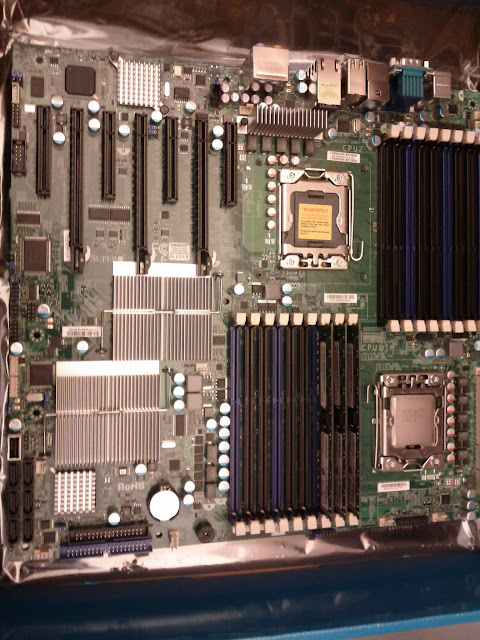 CPU and RAM mounted
 Not looking good
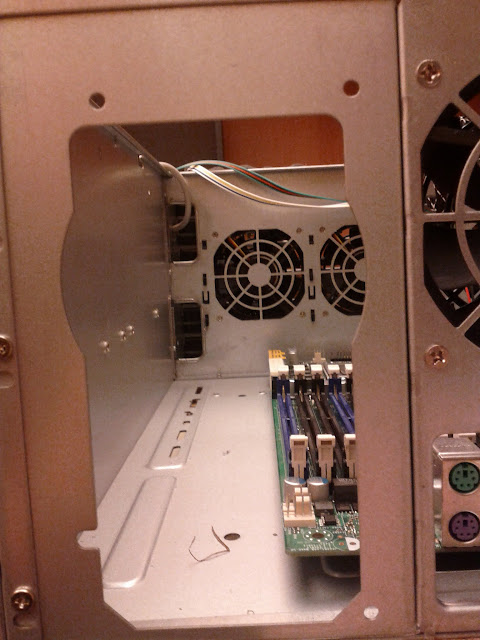 Not going to work
 Hard Drives
 1TB HDDs mounted
